Purpose:
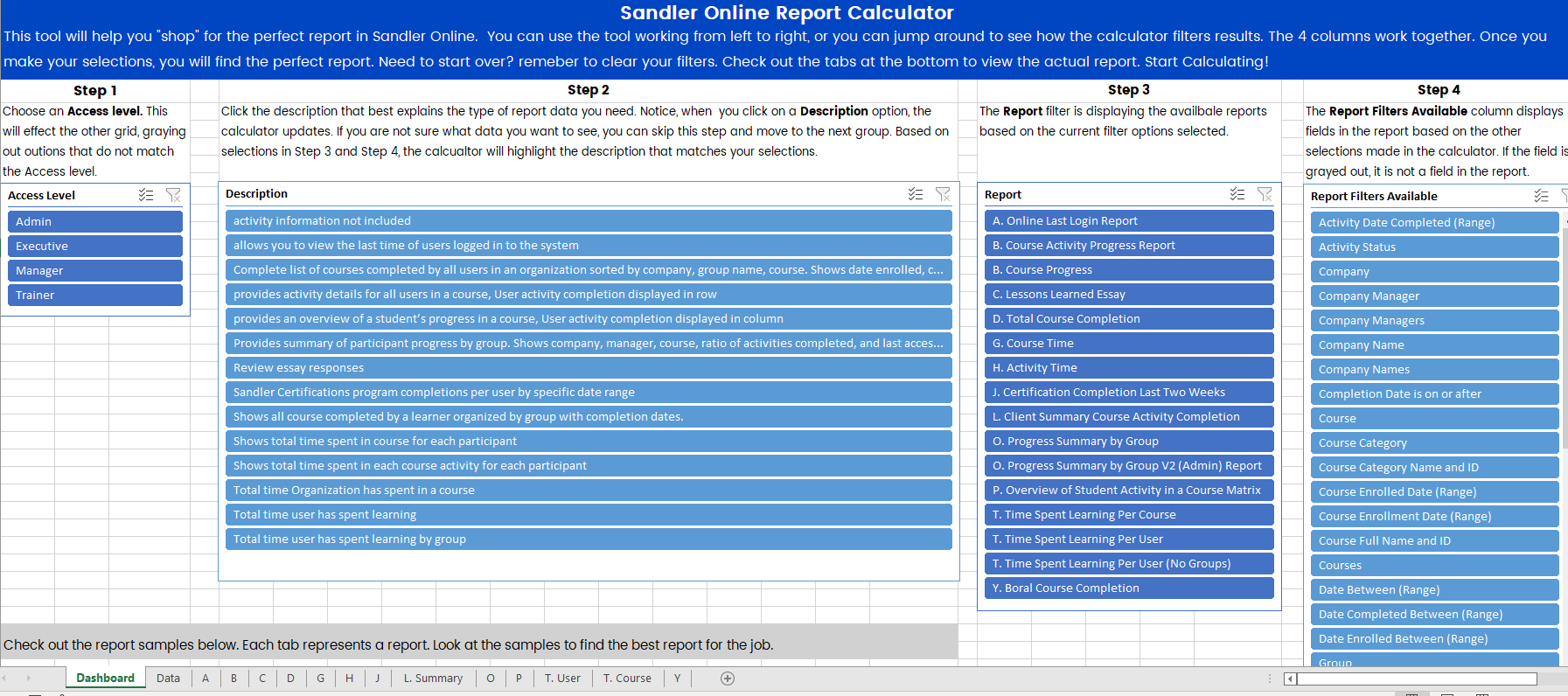
The Report Calculator is a spreadsheet with a complete list of reports, descriptions, and filters for each company role. By selecting criteria from each column, you can discover the best report format for your need.
The calculator works in any order. A step by step workflow is suggested for ease of use. Start with Step 1 and select you role. In Step 2, you will pick the best description to match the data you would like in your report. Step 3 displays the report name, and Step 4 displays the report fields.
The worksheet contains tabs at the bottom that provide examples of each report. This allows you to view the data and format to assist you in finding the best report.
Notes:
1. Make sure you clear filters when you change your selections. This will clear the slate and allow you to reset.
2. You can work in any order. The steps are just a guide.
3. When you click on an item, the other columns will "gray out" or deselect options that become unavailable. This helps you determine what is available based on your filters.
4. Step 4 is a list of fields that could be in a report. If you want to have specific fields, start here. When you select the fields you need in your report, the report column will adjust and filter to find a match.
The most current version of the calculator is attached to this article.
Comments
0 comments
Please sign in to leave a comment.