The following instructions are provided within the SharePoint file containing the SCORM files. The SharePoint file is shared with the client so they download the zip files for installation on their external LMS. These steps are provided in PDF form. The steps explain the best practices for uploading and organizing the zip files in their system.
This guide explains the best practices for successful download and deployment of Sandler Training content. Let’s get started!
Several Sandler Training courses contain groups of lessons. This is important when unzipping files. A zip file may contain additional zip files. Here is an example:
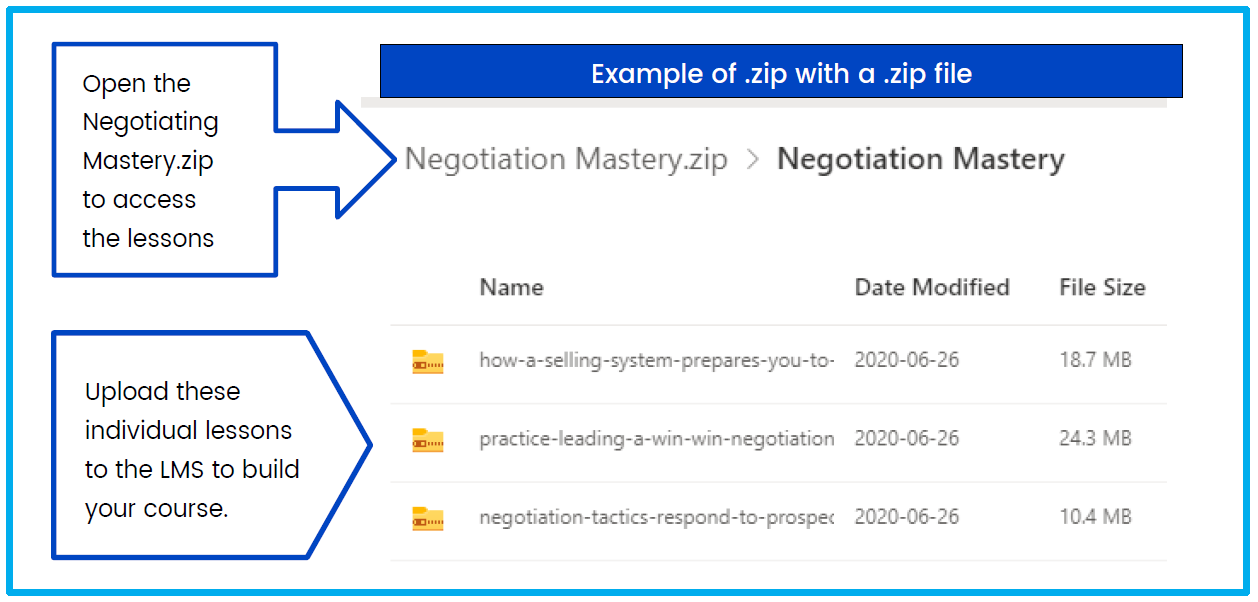
Sandler recommends naming the course with the Course Title. Then, name each individual .zip file as a lesson/chapter. In this example your setup may display as:
Negotiating Mastery (course)
- How a selling system prepares you to negotiate (lesson/chapter)
- Lead a collaborate negotiation (lesson/chapter)
- Negotiation tactics respond to prospects wo are asked for added value (lesson/chapter)
These steps eliminate upload errors related to uploading .zip files within .zip files.
The tip sheet can be downloaded and sent from this article:
Comments
0 comments
Please sign in to leave a comment.